Aller au contenu
View in the app

A better way to browse. Learn more.

Forumdephotos.com

A full-screen app on your home screen with push notifications, badges and more.

To install this app on iOS and iPadOS
  1. Tap the Share icon in Safari
  2. Scroll the menu and tap Add to Home Screen.
  3. Tap Add in the top-right corner.
To install this app on Android
  1. Tap the 3-dot menu (⋮) in the top-right corner of the browser.
  2. Tap Add to Home screen or Install app.
  3. Confirm by tapping Install.

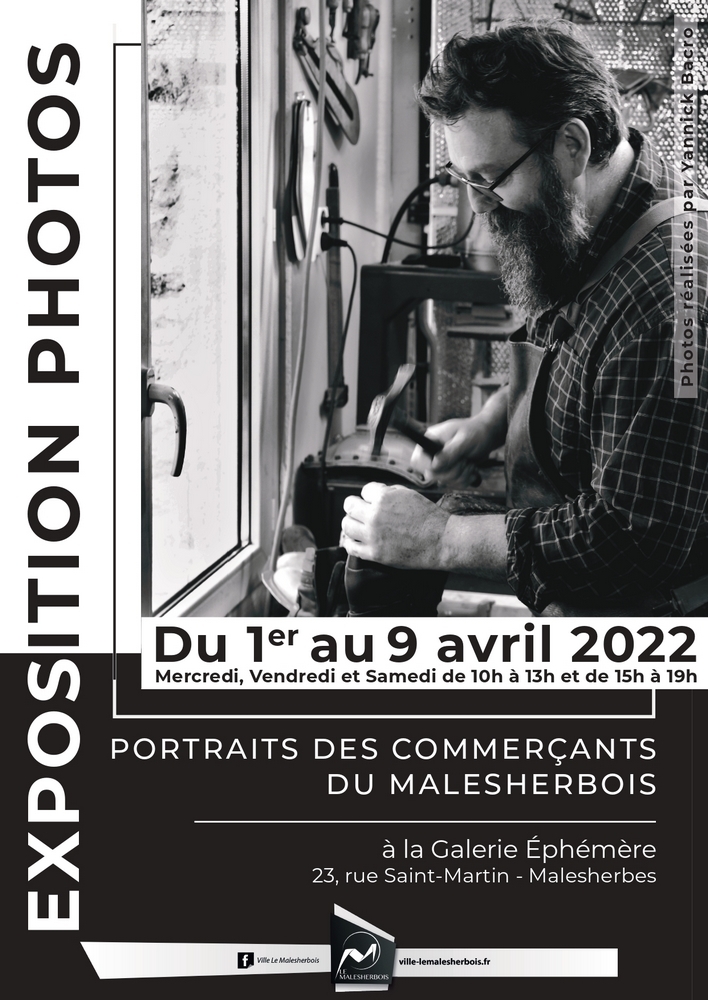
Mes Commerçants de Malesherbes

Une exposition qu'il me tenait à cœur de réaliser.

Mettre en avant les commerçants de ma ville qui, comme beaucoup, ont pas mal souffert ces dernières années. J'ai réalisé 36 portraits et la Mairie met enfin à ma disposition une petite galerie pour les mettre en valeur . Si il vous arrivait par le plus grand des hasard de vous perdre dans mon coin début Avril c'est ici que ça se passe  

affiche_expo 1000.jpg

Retour utilisateur

Commentaires recommandés

Posté(e)

C'est un peu trop loin pour moi, mais je te souhaite une belle exposition.

Posté(e)

On trouvera bien un moment pour aller voir ça. :) 

Posté(e)
il y a une heure, Nikita a dit :

On trouvera bien un moment pour aller voir ça. :) 

Ca va vous obliger à venir manger à la maison alors ! 

Créer un compte ou se connecter pour commenter

Account

Navigation

Rechercher

Rechercher

Configure browser push notifications

Chrome (Android)
  1. Tap the lock icon next to the address bar.
  2. Tap Permissions → Notifications.
  3. Adjust your preference.
Chrome (Desktop)
  1. Click the padlock icon in the address bar.
  2. Select Site settings.
  3. Find Notifications and adjust your preference.