Jump to content
View in the app

A better way to browse. Learn more.

Forumdephotos.com

A full-screen app on your home screen with push notifications, badges and more.

To install this app on iOS and iPadOS
  1. Tap the Share icon in Safari
  2. Scroll the menu and tap Add to Home Screen.
  3. Tap Add in the top-right corner.
To install this app on Android
  1. Tap the 3-dot menu (⋮) in the top-right corner of the browser.
  2. Tap Add to Home screen or Install app.
  3. Confirm by tapping Install.

Que choisir !

Featured Replies

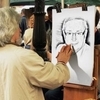
Madame admire ou ne sait quoi choisir devant cette présentation ...

La Motte Servolex.jpg

Pour le cadrage ... le personnage vraiment très excentré ... ? Mais je suis pas sur qu'en décalant un peu se soit mieux !

Très belle gestion de l'exposition avec toutes ces lumières différentes.

  • Author
Le 07/11/2018 à 22:30, Nikita a dit :

J'aurais préféré que la personne soit en entier sur la photo mais tu ne pouvais peut-être pas faire autrement. 


Nikita,  j'aurai bien pu prendre la personne en entier, mais elle allait envahir la photo, elle est large ,  les 2/3   suffisent amplement  il me semble ...

Create an account or sign in to comment

Account

Navigation

Search

Configure browser push notifications

Chrome (Android)
  1. Tap the lock icon next to the address bar.
  2. Tap Permissions → Notifications.
  3. Adjust your preference.
Chrome (Desktop)
  1. Click the padlock icon in the address bar.
  2. Select Site settings.
  3. Find Notifications and adjust your preference.