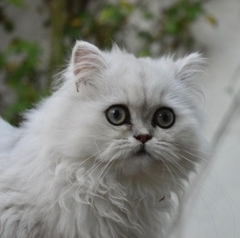
Posté(e) 25 septembre 20178 a Voici mon second chat, Papouf, ou "Love" sur le papier. Persan blue golden de 2 ans !
Posté(e) 25 septembre 20178 a On dirait un silver . Un très beau chat persan un peu plus typé que Nala. La profondeur de champ est bonne sur cette photographie et la lumière est bien gérée. Je pense que tu pourrais recadrer en enlevant un petit peu de la partie à gauche pour que le regard du chat soit encore plus souligné.
Posté(e) 25 septembre 20178 a Une belle photo et encore un beau regard avec de bons détails de sa robe
Posté(e) 26 septembre 20178 a je retiendrais la première qui est très belle avec une bonne profondeur de champ, la seconde est trop serrée à mon avis l'oreille est trop sur le bord du cadre
Posté(e) 26 septembre 20178 a j'aime un peu plus la dernière parce qu'on voit encore + ses beaux yeux un très beau chat et des bonnes photos pour moi


Créer un compte ou se connecter pour commenter