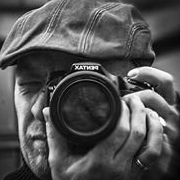
Posté(e) 12 octobre 20178 a C'est bien vu mais les blancs sont un peu forts sur la gauche du chapeau. Du coup, on perd un peu le tissage.
Posté(e) 12 octobre 20178 a Il y a 4 heures, Nikita a dit : C'est bien vu mais les blancs sont un peu forts sur la gauche du chapeau. Du coup, on perd un peu le tissage. je suis du même avis, et pour moi il y a que ça à corriger, le reste est très bon
Posté(e) 13 octobre 20178 a bien mieux la 2°version après un peu serré pour raconter une histoire... à mettre en scène
Posté(e) 15 octobre 20178 a Le 12/10/2017 à 15:46, Nikita a dit : C'est bien vu mais les blancs sont un peu forts sur la gauche du chapeau. Du coup, on perd un peu le tissage. Pas mieux... le cadrage aurait aussi été perfectible pour mettre davantage encore le chapeau en valeur en mettant plus de marge à droite. L'idée est par contre fort bonne. Bon coup d'œil, bravo !


Créer un compte ou se connecter pour commenter